亲,你好!如果你要查看下载链接,请注册登录后即可免回复直接查看更多内容噢!
您需要 登录 才可以下载或查看,没有账号?立即注册

x
织梦生成网站地图截图:
插件描述织梦一键生成各种sitemap网站地图文件( sitemap.html ,sitemap.txt,sitemap.xml,google.xml,rss.xml),符合各种搜索引擎抓取utf8 和 gbk 有齐2种编码插件文件根据自己程序编码选择对应插件,上传模块,安装,使用可同时生成5种地图文件 sitemap.html sitemap.txt sitemap.xml google.xml rss.xml支持自动绝对路径(无论你站是否开启绝对路径)makehtml_sitemap.phptemplets/makehtml_sitemap.htm../templets/plus/sitemap.html../templets/plus/sitemap.txt../templets/plus/sitemap.xml../templets/plus/google.xml../templets/plus/rss.xml发表文章后马上更新地图如果你想让插件支持发布文档后自动更新sitemap地图,你可以这样做
1、后台-系统-系统基本参数,添加个变量开关
变量名称:cfg_makesitemap
变量类型:布尔(Y/N)
参数说明:发表文章后马上更新地图
变量值:Y
所属组:站点设置
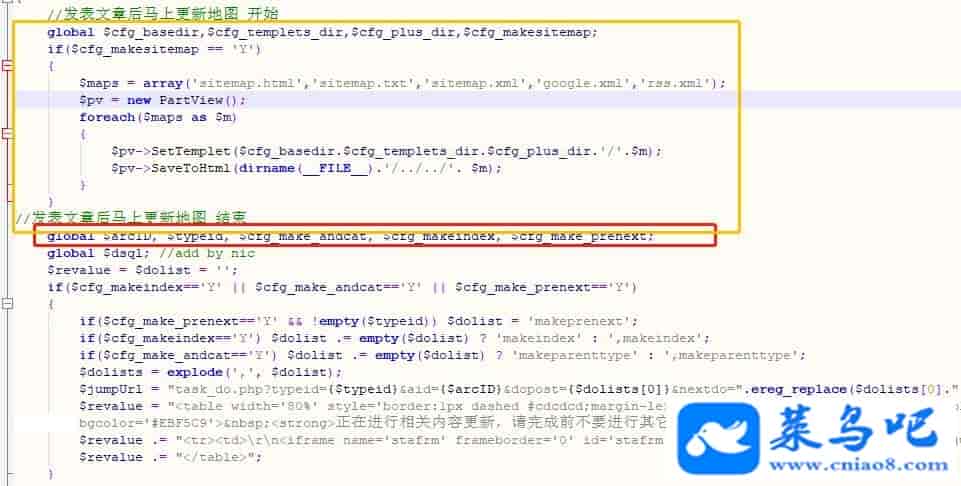
2、打开 /dede/inc/inc_archives_functions.php 找到
global$arcID找到这一行,在它上面加入
//发表文章后马上更新地图 开始global $cfg_basedir,$cfg_templets_dir,$cfg_plus_dir,$cfg_makesitemap;if($cfg_makesitemap == 'Y'){$maps = array('sitemap.html','sitemap.txt','sitemap.xml','google.xml','rss.xml');$pv = new PartView();foreach($maps as $m){$pv->SetTemplet($cfg_basedir.$cfg_templets_dir.$cfg_plus_dir.'/'.$m);$pv->SaveToHtml(dirname(__FILE__).'/../../'. $m);}}//发表文章后马上更新地图 结束
游客,您好!下载链接已隐藏,如果您要查看本帖的下载隐藏内容请 登录后可见 | 

 精品源码资源